Shows and lineups at a glance
See where every show stands without opening it: who is on the bill, who has said yes, and how many tickets the box office has sold.
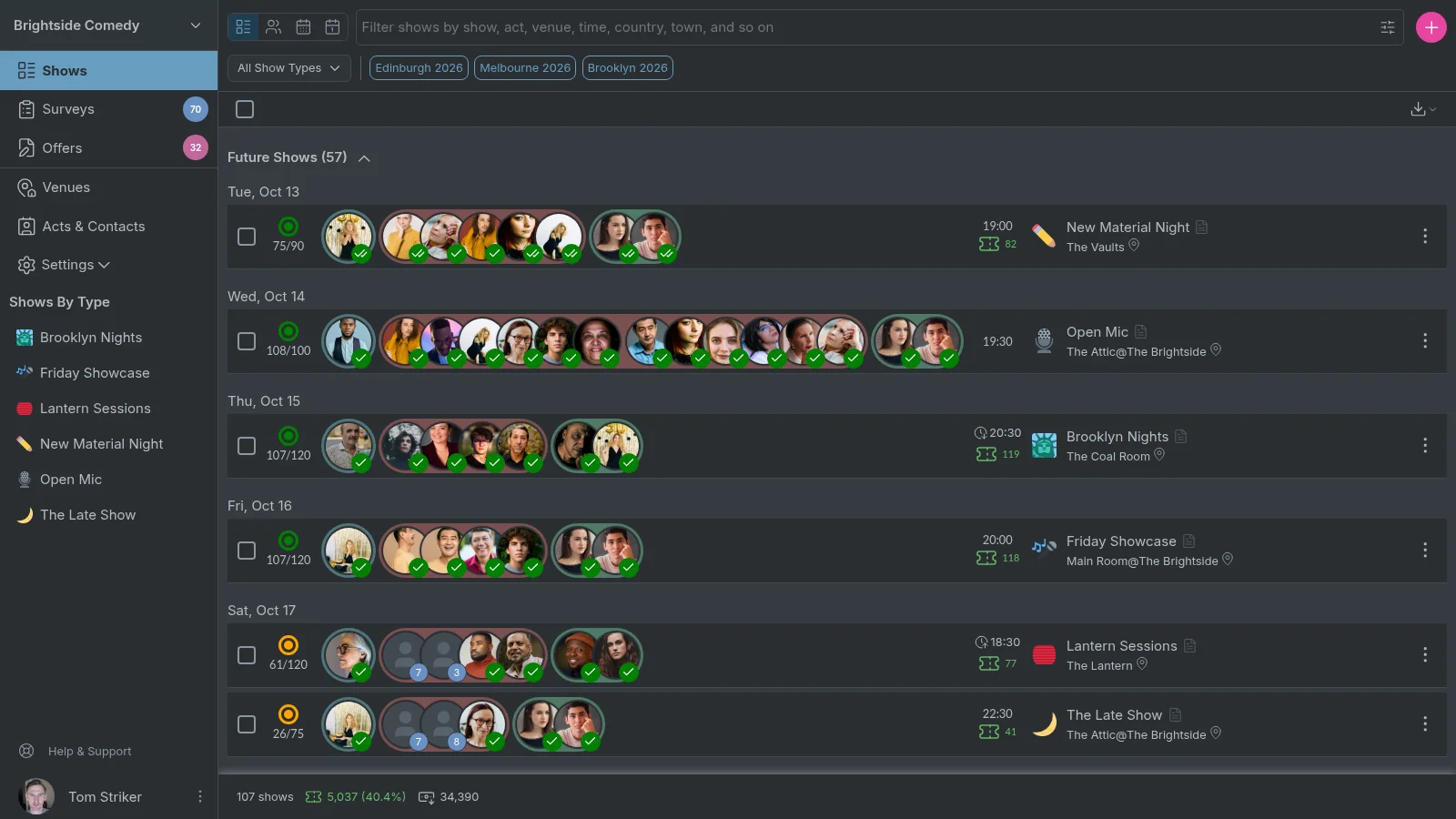
Where each show stands
The dot beside each show is its status, and it tells you whether the show is ready to go ahead. One look down the list shows you which nights need work. Production spots don't count towards the status, since a show can still go ahead while you find someone for the door. When the list runs long, search and filters narrow it to the shows still missing an act or a yes.

Every spot, where it stands
The lineup keeps a show's spots in running order and groups them into hosts, acts and production.
Three kinds of spot
-
Hosts
Hosts run the room and bring each act on.NA
-
Acts
Acts are in running order, and a gap between two of them is a break.DMCR
OP -
Production
Production is the crew behind the night, such as the showrunner and front of house.SEML
Six states a spot moves through
-
An open spot, with the number of acts who applied for it.3
-
Pencilled in. Only your team sees it until you send the offer.LF
-
Offered, and waiting on the act's answer.JH
-
Confirmed.ST
-
Confirmed, and they have answered the reminder to say they are coming.IB
-
You've paid the act.OP
When an act turns a spot down, the spot opens again and goes back on your surveys. The act moves to the end of the lineup, marked as rejected, so you can see who said no.

Time zones, taken care of
Each show lists its start time in the venue's time zone, so it always matches the poster. When you are in another time zone, a clock icon marks the time, and clicking it shows when the show starts for you.
Brooklyn Nights starts at 8:30pm in New York, which is 8:30am on Saturday 31 October where you are.
Box office figures (pro or festival)
You can connect your Red61 box office to see each show's sales beside its start time. Red61 emails Confirmed a sales report every 15 minutes through a run, and connecting it has a one-off setup fee of £45.
Open a show to build its bill
Drag an act from one spot to another until the bill runs in the right order. Everyone you place stays pencilled in, between you and your team, until you send the offer.
Everyone you could book is right beside the bill, ready to drag into a spot, and on a phone Fill Spot lists them. Open an act to see their survey answers, your notes, and a calendar of their last three months with you, no-shows and cancellations marked.
Give the regulars a rest
Narrow the acts you can book to the ones you have never booked, or have not booked on this show in a month, and sort them by when you last booked them. A fresh bill takes a couple of clicks, not a scroll back through your calendar.
Plan next week's bills
- 14 days free
- No credit card needed
- Cancel anytime
Not sure it's a good fit? Book a call with us.